This guide will teach you about refining the basics resources, many of the resources acquired from hunting and mining need to be refined before being used for crafting. Refining has many other advantages including lowering the weight of what your carrying, creating mind force ammo and pet food.
A basic refiner can be brought from a trade terminal. Refiners come under the tools tab in the inventory (Default key "I"). To equip and use the to refiner, right click on the refiner and equip. To bring up the refiner window press the use tool button (Default key "E").
Once the refiner window is open, simply drag and drop what you want to refine from your inventory into the refiner window, and hit the refine button. It only takes a few seconds to refine, not matter what stack size.
It normally takes multiple resources to refine down into its refined element. The output value will be equal to the value put into the refiner, even if the stack size and weight is less. Any resources left over, they will be returned to the inventory unrefined, for example:
1 Lysterium Stone is worth 0.01 at the trade terminal
1 Lysterium Ingot is worth 0.03 at the trade terminal.
It take 3 Lysterium Stone to make 1 Lysterium Ingot.
Some refinements requires multiples types of resources, creating "Mine Essence" (Mindforce Ammo) or "Nutrio Bars" (Pet Food) are a few of these.
1000 Vibrant Sweat (0.01 TT) + 1000 Force Nexus (10.00 TT) =
1001 Mind Essence (10.01 TT)
1000 One type of found fruit (0.01 TT) + 1000 Sweetstuff (10.00 TT) =
1001 Nutrio Bars (10.01 TT)
The only cost of refinement is down to how economical your refiner is and how much you refine, the refiner will always return the amount of value that will be put into it, but the trade terminal value of the refiner will degrade with use. To be more economical when refining, it is best to refiner larger amounts of resources.
Many miners will refine their own resource before selling, not only to help with weight when going out on longer mining runs, but it also helps with selling the resources, a crafter is more likely to look for refined resources when buying. Although refining is not needed, as many resellers are happy to buy materials and refine it to sell.
Here is a few other examples of simple refinements:
From Hunting:
Animal Hide - Generic Leather
Soft Hide - Soft Leather
Fine Hide - Fine Leather
Wool - Wool Cloth
Thin Wool - Wool Thread
Fine Wool - Fine Textiles
Molisk Enamel Teeth - Molisk Enamel Buttons
From Mining:
Belkar Stone - Belkar Ingot
Lysterium Stone - Lysterium Ingot
Iron Stone - Iron Ingot
Melchi Water - Menlchi Crystal
Alicenies Liquid - Alicenies Gel
Dianthus Liquid - Dianthus Crystal Powder
Crude Oil - Oil
This is a brief overview of how to refine, to see a full list of all the possible refinement recipes in Entropia Universe, Click Here.
Other topics
This topic very briefly touches on many other topics, as refining is the in between of many professions, for example, linking finding fruit, mining and mindforce together, also refining creates a link between hunters, miners and crafters, and even the traders between that:
To read more about the basics of hunting, click here.
To read more about the basics of mining, click here.
To read more about finding fruits and other items on the floor, click here.
To read more about sweating animals for vibrant sweat, click here.
To read more about using mindforce, click here.
To read more about the basics of crafting, click here.
To read more about the basics of trading, click here.
Showing posts with label enmatter. Show all posts
Thursday, 11 April 2019
Wednesday, 27 February 2019
Guide: Mining Basics
This guide will teach you about the basics of mining. Here you will learn about locating ore and energy matter veins, extracting resources and summoning from claim deeds.
The "E" key (Default) is to use a tool, the "F" key (Default) is to auto-use the extractor.
You are able to create custom controls to use tools, auto use tools and to quickly switch between detector an extractor, you can learn more about the edit panel here:
Guide: Edit Interface
The first button is to search for matter, the second button is to search for energy matter, and the last button is used
for searching for treasures on certain planets. The treasure option is specific to some planets, and will be unavailable on some planets.
Over the right bottom side or the detector window, the detector will display how many mining probes each detection attempt will use, devices that use more probes tend to find bigger deposits, but this is also highly dependent on skill level.
A smaller mining range contains larger findings that are more difficult to find compared to a larger
mining range with smaller findings that are more easy to find.
Mining probes and basic mining equipment can be purchased from a trade terminal. If you are under level 10 it is recommended that you use equipment in the trade terminal or from the starting missions. Some other detectors you can use under level 10 are, Finder F101, Ziplex Z1 Seeker, Rookie TerraMaster, Genesis Star Rookie Finder (L), Imperium Trainee Finder (L) and TerraMaster 1 (L)
When you have selected what you want to detect and are standing where you want to mine, right click the ground or press "E" (default key) and use your tool, or use what ever control method you prefer to use the tool.
Once a probe has been dropped, the detector window will display if a deposit has been found or not. If a deposit has been found a claim beacon will appear in the world, a claim deed will be placed in your inventory and the detector will guide you to the location of the claim beacon. The detector will also display additional information about the claims it finds, the range, the depth and what resources it has found if this information is available.
With a mixture of sticky notes and waypoint links, storing this information in game with no extra tools can be very easy. To learn more about sticky notes, chat commands and keyboard controls, click here: Guide: Edit Interface
To equip attachments to an items, simply drag the attachment to equipment it is designed for. To view what attachments are attached to an item, view its item info. On the item info screen you will be able to individually detach attachments.
Many miners will refine their own resource before selling, not only to help with weight when going out on longer mining runs, but it also helps with selling the resources, a crafter is more likely to look for refined resources when buying. Although refining is not needed, as many resellers are happy to buy ore and refine it to sell.
This is a very important factor to whether a miner is successful or not. Every profession requires a little bit of trading savvy to be successful, as it is an integral part of the game.
To learn more about trading in general click here.
Equipping Equipment And Basic Controls
To view your inventory press "I", here you can access your mining equipment under the tools tab. Right click the item to access its options. From here you can view details of an item or equip an item by right clicking it. Mining equipment consists of a detector, an extractor and mining probes.The "E" key (Default) is to use a tool, the "F" key (Default) is to auto-use the extractor.
You are able to create custom controls to use tools, auto use tools and to quickly switch between detector an extractor, you can learn more about the edit panel here:
Guide: Edit Interface
Detecting Ore And Energy Matter
When you have any detector equipped you will see the detector window, in this window you are able to see a radar with 3 buttons below, these buttons are for selecting which type of type of resource the detector should search for.
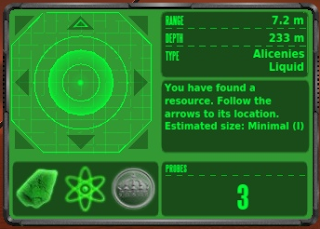
The first button is to search for matter, the second button is to search for energy matter, and the last button is usedfor searching for treasures on certain planets. The treasure option is specific to some planets, and will be unavailable on some planets.
Over the right bottom side or the detector window, the detector will display how many mining probes each detection attempt will use, devices that use more probes tend to find bigger deposits, but this is also highly dependent on skill level.
A smaller mining range contains larger findings that are more difficult to find compared to a larger
mining range with smaller findings that are more easy to find.
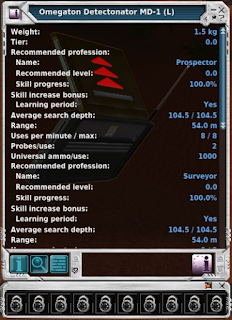
Mining probes and basic mining equipment can be purchased from a trade terminal. If you are under level 10 it is recommended that you use equipment in the trade terminal or from the starting missions. Some other detectors you can use under level 10 are, Finder F101, Ziplex Z1 Seeker, Rookie TerraMaster, Genesis Star Rookie Finder (L), Imperium Trainee Finder (L) and TerraMaster 1 (L)When you have selected what you want to detect and are standing where you want to mine, right click the ground or press "E" (default key) and use your tool, or use what ever control method you prefer to use the tool.
Once a probe has been dropped, the detector window will display if a deposit has been found or not. If a deposit has been found a claim beacon will appear in the world, a claim deed will be placed in your inventory and the detector will guide you to the location of the claim beacon. The detector will also display additional information about the claims it finds, the range, the depth and what resources it has found if this information is available.
Summon Claim And Extract
To extract resources you simply have to equip and use an extractor on a claim beacon that you own, click the claim beacon and press "F" (Default Key) start auto extracting. If you are unable to reach a claim beacon due to the terrain being awkward, you are able to summon claims close to you using the claim deed placed in your inventory.Track Your Findings
If you want to mine the most efficient way, you need to spend a little money on locating a good mineral field. The best way to do this is testing new locations, it is a good idea to keep a records of your finding locations and resource type. Each area is be unique in what resources you find, try many locations for different resources.With a mixture of sticky notes and waypoint links, storing this information in game with no extra tools can be very easy. To learn more about sticky notes, chat commands and keyboard controls, click here: Guide: Edit Interface
Amplified mining
You can attach attachments to your detector tool to help improve your ability to find resources. Although it has the potential to cost more to use, the chances of finding larger amounts of resource are a lot more likely.To equip attachments to an items, simply drag the attachment to equipment it is designed for. To view what attachments are attached to an item, view its item info. On the item info screen you will be able to individually detach attachments.
Limited And Unlimited Equipment
Some equipment can be repair and some equipment is disposable once used. Items with an (L) in the name are limited items. Limited items can not be repaired and are disposed of when they can no longer be used by selling them to the trade terminal. Items without the (L) in the name can be repaired at a repair console for PED.
Tier And Enhancers
Equipment has the ability to level up to unlock sockets, this is known as the tier level of an item. Sockets allow you to add enhancers to equipment to modify the statistics of an item.
Limited (L) items have the ability to unlock sockets when they tier up automatically, and continue to level up. Unlimited items require resources to tier up when they reach the required level to unlock a socket and continue to level up. When an items is ready to be upgraded, the resources used in the upgrade will be converted to shrapnel.
Enhancers can be attached at the bottom of the equipment info screen. Each enhancer can only be attached to the sockets number equal to the enhancer level, for example, a Mining Finder Depth Enhancer 2 will only go into the second socket of a mining detector device. Enhancers can stack and do not degrade like other equipment, rather they have chance of one being destroyed every time you use the item.
The chances of this happening is very small, but because the chances of enhancers break is down to luck, you can use one for ages and then break few in a row. Enhancers have a lower chance of breaking on a limited tool. When enhancers break they will return the trade terminal value in shrapnel.
Loot!
When you have finished mining, you will want to sell your loot, the best way to sell loot is to another player, you will always get more PED from a player than you would from a trade terminal. Anything you are unable to sell, save in your storage to sell later.Many miners will refine their own resource before selling, not only to help with weight when going out on longer mining runs, but it also helps with selling the resources, a crafter is more likely to look for refined resources when buying. Although refining is not needed, as many resellers are happy to buy ore and refine it to sell.
This is a very important factor to whether a miner is successful or not. Every profession requires a little bit of trading savvy to be successful, as it is an integral part of the game.
To learn more about trading in general click here.
Subscribe to:
Posts (Atom)
