Sunday, 17 February 2019

Guide: Finding Items

(Since VU16, this guide has become out of date. Click here for an up to date guide!)

In Entropia it is possible to stumble across free natural items simply by walking around or stopping for a few seconds. These items include fruit, natural stones and dung.


Learn To Walk

You are only able to see fruit, natural stones and dung if you are walking or standing still, you will not see these when running.

To toggle between running and walking press "Q". No skill is required or gained in searching for natural items.

The best way to find natural items is to walk the paths least walked, they can spawn anywhere on the floor across any planet, so the places least walked will surely be more likely to have more! It is best to have the camera in 3rd person to get a good view around your character.

Items come into view at a much smaller range than everything else you can see. When you do find items, simply right click on it and pick it up.

Specifically going out and looking for natural items is harder than sweating and will require more patience. Also as there is no skill gain in finding these items, your character is not growing.
.
Fruit can be refined into nutrio bars by putting any fruit and sweetstuff into a refiner, sweetstuff is an energy matter which is mined and nutrio bars are used to feed pets. Natural stones are used in crafting and dung are used by land owners.

Finding Oil


Roctropia Docks (Red Square)
There are a number of locations in Entropia where you will be able to find and collect crude oil. You do not need to be walking to be able to see these oils barrels.

These barrels can be found in certain PvP areas, on Calypso, Arkadia and Rocktropia. You can not be looted in these PvP areas, so you can try as much as you want without worrying about losing anything. If you do happen to get attacked, you will likely gain evasion and dodge skill.

Arkadia Oil Rig (Red Circle)
The easiest place to get access to crude oil is the docks on Rocktropia, as there are no animals or robots in this area to attack you, you can  simply walk into this area on foot with no issues and the respawn point is right next to the area.

The closest teleporter to the docks which every new person starts with is The Hyperplex.  Crude oil will spawn anywhere in the dock area on the floor.

The only threat here is a very small minority of other people, most people come here for oil and do not wish to waste ammo.

The oil rig on Arkadia is harder to get to because it is surrounded by the native life. The best way to get to the center of the rig is to fly in a vehicle. The closest teleport to this rig is Scrap Yard.

Crude oil  can be refined into oil, which can be crafted with or used to refill your vehicles.

There are a number of other rigs that exist in Entropia, for example the Beer Garden Draft on Rocktropia drops the Motorhead kegs. Which are used specifically in crafting items using blueprints from Rocktropia.

Saturday, 16 February 2019

Guide: Edit Interface

(Since VU16, this guide has become out of date. Click here for an up to date guide!)

This guide will show you how flexible the overall interface in Entropia is, here you will learn about the chat interface, heads up display, waypoints, keyboard controls, contacts list and a few other display related options.

The Edit Panel

Normally only the radar, global display and chat windows can be moved, buttons can only be clicked/right clicked.

Pressing the "L" key on your keyboard will bring up the "Edit Panel". While the edit panel is open you will be able to move/add/remove most of the buttons that are on your screen simply by dragging the buttons, except the main buttons in the top right, these will be greyed out. "F1" through to "F9" lets you to switch between layouts, allowing you to set up multiple key bindings and on screen buttons.

The edit panel consists of two windows, the main window and the recycle bin window, this is where you can drag buttons you no longer want.

The first button on the main window will bring up the keyboard layout. This is where you can bind buttons to keyboard keys, allowing you to quickly access to things from your inventory or an action.


The second button will open the Action Library. This is where you can find buttons for actions in Entropia. A few examples of action buttons in Entropia are emotes, dances, vehicle controls, interface controls and interaction controls. One of the most useful actions in Entropia is the "Auto Use Tool" button, this button is not set to anything by default at the start.


The third button will open your Inventory. While the edit panel is open, you will be able to drag items from your inventory to your screen or keyboard. This includes weapons, armour parts, clothing, tools, vehicles and mind force chips.

The forth button on the edit panel simply resets everything back to default.

You are able to create a button to equip multiple clothes or multiple armour part in one button, this can be done by first equipping what you want, then right click>Equipment>Create Armour/Cloth Set. This also drastically speeds up the equipping time of these items.


The Chat Interface

The chat system is as simple as any other game, press enter, type message, press enter again to send. If you press up or down while the chat window is active, you will be able to scroll threw previous messages, this is handy for trading.

To change what chat channel you are talking in, on the left of where you type your message will be the channel name of the channel you are talking in, click that to change channel. The default will be [Local].

[Local] Non-trade, local area chat.
[Trade] Local area chat used for trading.
[Rookie] A global channel for advice.
[Society] Global channel, chat with society.
[#Trade] Any channel starting with a "#" is a custom chat channel created by a player. These channels are global chat channels.

You can also change your chat channels by clicking on the channel link in the chat window next to a players name chatting in that chat channel already.

If you right click the tabs at the top of the chat window, you can select what channels you want to display in what tab and what colour to display it in. You will also be able to create new tabs and remove unwanted tabs.

If you drag a tab off of the window, you can create multiple chat windows, to merge a window simply drag it to the window you want. The button next to the X top right, the arrows point down, merges all tabs in that window to the main window.

To send a private message to someone, simply click their name link in chat or right click their avatars and goto avatar, private chat.

There are also a number of chats commands which you can used, the most commonly used command is "/pos" or "/p" which displayed your position in the chat channel you are in, in the form of a nice clickable waypoint. Another useful command is "/join #channel", which is used to join a custom chat channel. To see a full up to date list of commands type "/help".

Map And Waypoints

To bring up the map press "M", here you will be able to see your location, known teleporter locations and known area location on the map. Missions with a waypoint that are currently active will show up here along with any custom waypoints added.

To add a custom waypoint to the map, right click the location, then click add waypoint.
Alternatively, you can also click on waypoint link from chat to add a waypoint someone sent.

If you right click a waypoint added on your map, you will be able to rename and copy that waypoint allowing you to send waypoints with custom names. Walking over a waypoint automatically removes it from your map.

To add more teleporter location, you must find and walk over the teleporters, once added you can freely move between teleporter.
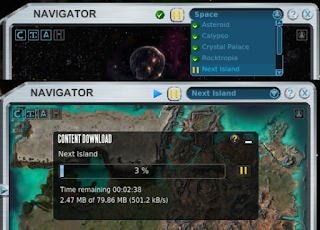

The map can also be used to download space stations, planets and space itself all in game. With the drop down menu at the top, select what map you want, then click the play/pause button next to it start/pause downloading. A window will pop up with a download bar.

When on a planets, you will only be able to see space and other planet  related maps in this drop down menu, for example Arkadia and Arkadia Underground, when in space you will see all the planets here.


The Message Center, Sticky notes and Contacts

In the top left corner of your HUD, you will find the message center button, and in the top right corner of your HUD is the contacts list button.

The message center will turn orange when there are unread messages with the number of unread messages showing up as a number above it, and what type of message it is under.
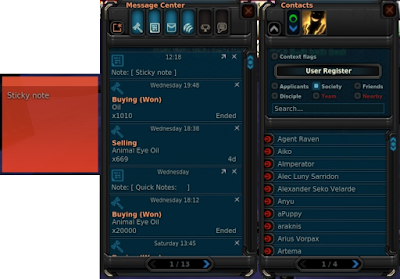

Along the top of the message center screen you will see 7 buttons, the little button on the left is the 'New' button, this is used to create a message or a sticky note. Message center messages are able to be sent to offline people and are kept in the message center until deleted, just like an in game email.

Sticky notes are a handy way of storing handing information in a note on screen, these notes are also stored in the message center until deleted. To remove from screen and save in the message center, click the arrow buttons in the top right of the stick notes corner. To change the sticky note colour or to delete the sticky notes, click the setting button in the top left corner of the note.

The 6 other buttons along the top of the message center are used to filter messages in the message center, from left to right these are what the buttons filter: "Auction Messages", "Sticky Notes", "Mail", "System Messages", "Global/Hall Of Fame", and "Tutorial Messages".

The contacts window will give you the ability to change your player profile and online visibility to other people. You can also view and send messages to friends, society members and disciples.

Setting And Other Options


There are a few more interface options in the setting, which is accessed via the "Esc" key. In the setting, and clicking HUD.

If you disable the loot window, instead of a window filling up with loot that you have to keep closing, you get a small temporary display of the loot in text with the trade terminal value next to it in the top left corner of the screen.

Here you will also be able to adjust the frequency of the global ticker, the higher the PED the less frequent, and how the ticker is displayed, always visible or invisible when not active.

A few other useful options here are the text size options, hide tutorials and align satnav with camera. Changing the satnav option will effect if the satnav is locked to north or lock to the the camera.

Friday, 15 February 2019

Guide: Sweating

(Since VU16, this guide has become out of date. Click here for up to date guide!)

This guide will teach you all about sweating animals within Entropia. The only tool that is needed is the VSE MK1, which every player gets right from the start, but a healing tool and a vehicle will be handy for this guide. (Valkyrie car can be acquired from Thule the tutorial area, and a Vivo S10 healing tool can be acquired from the gauntlet).

Simple Sweating

To start sweating, simply go to the tools tab in your inventory (I on keyboard), and right click on the green round gun called the VSE MK1 to equip it. Then find a creature to click on a few times, after a few attempts, you will see a green mist, this is the extracting phase.

In the extracting phase if you get hit or the creature moves out of your cross hairs, you will fail to extract. If you do not get hit and you keep the creature in your cross hairs for a few seconds, you will acquire some sweat.

After a number of extractions the creature will run dry on sweat, after this you will want to kill it, most people run to a turret and some shoot it, you can also drown the creature in water.

The skills you will gain while sweating are also valuable in a number of other professions, including hunting, mind force, and healing. With a tiny increase to other skills not related to these.

Auto Sweating

Sweating is as simple as that, but there are a few things that will make sweating so much easier.

The "Auto Use Tool" button! This will not only save your wrists, but will help in other things like shooting and repairing. To quickly set this up, press L to open the Edit Panel, press G to open up Keyboard Layout, then press Y to bring up the Action Library Book.

In the Action Library book write "Auto" into the search bar and then click on "Auto Use Tool", the page will turn, then drag "Auto Use Tool" to your screens heads up display or to a black keyboard key. Once you have done that, simply close all them windows. This button/key will allow you to toggle repeat fire mode.

You can learn more about the edit panel here:
Guide: Edit Interface

Group Sweating Locations

There are a number of locations where players sweat in a group to share damage to last longer, heal less and get more sweat. Overall this method will provide much more sweat in a shorter time but you will acquire less evade experience.

When sweating in a group of people, in the perfect situation, every one should stand in a circle around the animal, so that the animal does not run about to hit its target, causing failed extractions.
The creature should only need to turn on the spot to reach its next target.
If the animal hits you, do not move and do not panic, it is not worth running, if the creature can hit you, it will hit you, moving does not effect your ability to evade a hit. If anything, the more you get hit, the more likely you will gain evade experience, the more likely you will be able to evade hits in future. The ability to evade is one of the more sought after skills for a hunter.


The easiest group sweating location to get to is Boreas. Teleport to the Isle of Troy then travel west to the edge where the land is no longer a solid green. From there you will be able to teleport or die and revive at Boreas. This is where a vehicle could come in handy.

Selling Sweat

The VSE MK1 does not degrade. You can use it as much as you want. This is one of the free abilities in Entropia, Sweat in itself is a valueless item to the system.
The value of sweat to a buyer depends on their needs for the sweat, and to a seller the value depends on their persistence to always be patient and look for a better price.

When it come to selling sweat, patience is a virtue, everyone has the ability to sweat, but not everyone has the ability to craft using that sweat, this means sweat is in a much higher supply than demand.

The best places to find buyers is at a group sweating locations, when a buyer wants to buy, the first thing they think is "Where are there lots of sweaters?".

These buyers tend to come and go in moments compared to how long sweaters sweat for at these locations. Calling out  "WTS Sweat" will not help, almost everyone wants to sell sweat.

The best thing you can do is to sweat a bit more to sell more for when that valuable buyer comes by, and when that buyer does come by, make a note of that persons name and their price, make a friend, and sell for the best price you can. Sweat is normally sold in stacks of 1000, check with other sweaters for the average selling price at the time so you know what to aim for and you are not undercutting yourself.

Uses For Sweat

Last but not least, many new people wonder what sweat is actually used for. The top 3 uses for sweat are making mind essence, making welding wires and missions.

Mind essence can be made by mixing force nexus and sweat in a refiner. Force nexus is an energy matter that is mined. You are able to purchase a standard refiner from a trade terminal.

Some blueprints like the welding wire blueprint requires sweat along with other materials, welding wires are used like ammo with the vehicle repair tool to repair vehicles.

There are also a number of missions that require sweat to complete, a few examples of these are the Arkadia Passport missions and Missions Galactica.


Thursday, 7 February 2019

Update soon...

Please Stand By...

...Update Coming Soon...

In the next coming month creating an in depth tutorials page. I will be post each individual tutorial as it comes. Thank you for every persons support so far. 

Saturday, 1 July 2017

Issue 12: Loot 2.0


Entropiazine

A Monthly Entropian E-Magazine.

In this month's publication of Entropiazine:
Compet: Notice to deed holders
Long awaited: Loot 2.0
Hogglo Diablos Attack: Fort Argus!

Author: [Felix Zell Shallow]


Hogglo Diablos Attack: Fort Argus!

Hogglo Diablos have been rampaging around near Fort Argus! The super-sized creatures are the result of a series of genetic experiments performed by deranged criminal Gareth.


Even though Hogglos have once again been pushed back! Attacks so far have occurred near an abandoned outpost. The outpost and surrounding area are covered with white vents that protrude from the ground, indicating the presence of some kind of underground facility.

The door to each vent bears the Omegaton logo. When questioned about their connection to the outpost, Omegaton replied that they simply built the doors and did not assemble the outpost itself. Furthermore they said they had never owned the outpost. All entries regarding the building and ownership of the outpost are currently missing from official records.


Compet: Notice to deed holders

Compet is available is on a number of systems, excluding any mention of windows mobile OS. Compet is now currently still awaiting on the release on iOS, a statement from creators say that the release of Compet on iOS is in its final phase and should be available shortly although no release date has been stated.

Many things have been implemented since the last time we had a detailed look at Compet, like recent addition of adding in PECs, just like Entropia PEDs and PECs, this will allow people to have battles at a lower prices and the new front page menu which allows you to jump strait into a battle, along with a loads of the new creatures to own.


A small comment to the Compet deed holders indicates that the revenue payment system will be implemented after a number of tasks have been completed.

Assuming that deed payments start when the final product is being marketed to the general public, It has been stated that a number of things are to still being developed before marketing can begin. The Tournament and eSports system is currently in development which should widen the audience and appeal of Compet. Another major part of the concept is the “cross-platform” trading aspect. This feature is currently in development both in Entropia Universe and Compet. Additional language support will also be added for worldwide players and general optimization and fine tuning of game play.

In addition to all of this expect to see strongboxes and buff items called Trinkets. Not much was mentioned about this, but assuming them to be like Entropia Universe's strongboxes, we have an idea on what to expect.2

Deed revenues is already currently being accumulated and payments will begin once ComPet is fully functional. So expect the first payment to be a few months worth's of payments. To back track on the value of the compet deed in Entropia, the original price on the web store was priced at 100 PED per deed, then just as before the web store stopped offering compet deed's the price went up to 120 PED per deed. Since the web store has closed the value of the compet deed declined slowly over time, the average of over 800 sales this month on auction 93 PED per deed. Some deeds going for as low as 88 PED per deed.


Long awaited: Loot 2.0

"MindArk has been monitoring the community discussions concerning so-called 'loot waves' and will implement changes in the Loot 2.0 and subsequent Version Updates that will address this issue by improving the distribution of resources and items, with the goal of ensuring that loot opportunities are more interesting, dynamic and fair for all participants"


This month MindArk has released a long awaited loot update that overhauled the way in which hunting loot is calculated and distributed, which will significantly improve overall loot returns for the vast majority of participants in the hunting profession. Although the current looting system has been released, there are some changes still being finalized and tested, therefore expect subsequent patches or version updates.

The loot calculations will be optimized and improved to better factor in the various costs associated with hunting activities, this includes healing, ammo consumption, buffs, tool and armor deterioration, attachments, and more.

A new economy rating parameter has been introduced on the item information screens of weapon, attachments and mindforce attack chips, on a scale of from 1 to 100, that indicates the efficiency of a tool and which influences loot calculations. This change from the once dominant damage/pec model will provide the design team at MindArk with more freedom to release exciting and interesting items with a wider range of damage output and special effects.

Since the update general loot return has improve from creature to creature, no more no loots, ammunition has been removed from hunting loot has been replaced with shrapnel. Expect the price of Nova and Blaza fragments to rise, as none as seen yet has been dropped.

Armor has also had a bit of an update, Armor now decays significantly less per point of damage absorbed, and no longer has a minimum decay based on total protection, it will now always decay proportionally to the amount of damage absorbed. Armor and armor platings now decay independently based on the amount of damage they each actually absorb, rather than both decaying as if absorbing the full amount of received damage. Armor can now absorb all incoming damage down to a minimum of 0.1 point of damage taken, instead of the previous 1.0 points of damage.

A profession level requirement will be introduced for unlimited armors. Meeting the required level results in the armor offering full protection at all condition values. If the profession requirement is not met, armor works as before, with protection decreasing relative to condition.

Many of the changes seem to be well received by many, but a few are saying they miss getting more globals and would like to see more loot other than shrapnel.


First Laser Sniper Master!

A landmark moment occurred this month with “Gaina Messi91 Cristi” became the first ever avatar to reach the skill level of Entropia Master, attaining level 200 in the Laser Sniper (Hit) profession.


Friday, 2 June 2017

Issue 11: Bug hunting season


Entropiazine

A Monthly Entropian E-Magazine.

In this month's publication of Entropiazine:
Infested: Marcimex attacks
Transport Tokens: Rocktopia travel
New Social Media Journalist: Jason Journalist Levine

Author: [Felix Zell Shallow]


Infested: Marcimex attacks

Marcimex are massive underground insects that have hardly ever been seen on the surface of Calypso, this month these insects have been have been found scurrying the surface attacking the local colonists. In fact this is such a rare occurrence that this is only the second time this has happened in recorded history since humans have landed on Calypso.


One Entropian xenobiologists has suggested the queen has been likely disturbed by the humans activities on the surface which could include a number of factors, such as the vibration from vehicles and mining probes.

He further adds that it would seem that the queen seems to be culling the weaker broodlings of the hive in a form of selective breeding to make the hive stronger, but it is unknown if this is for defense or offensive reasons.


Battle Simulator: Update

The battle simulator has been updated with a bigger prize pool, but the cost of entry has now raised up to 6 PED per play. The success of the battle simulator since its inception shows that it will be here to stay.


Transport Tokens: Rocktopia travel


Although last month I mentioned a statement from Mind Ark about not implementing transporter tokens, that has not stopped John Jacob Neverdie from implementing the start of his concept on his own planet Rocktopia.


Even though the first part of his project has been implemented, we are yet to see the second part of his plans to come to fruition. Neverdie stated as he wants to create online jobs within Entropia.


Other Small Updates: Spawning waves and loot

Many of the wave spawns have been updated across Calypso, this includes the robot invasion events on forts across Calypso, the invasions will continue to occupy an area until retaken by colonists.

Another change is to robots loots, Drokas and Drones will no longer drop animal muscle oil and calypso bone samples.

And finally, Pyrite prices are set to rise a little more as the supplies at a number of PvP areas have dropped to a rarer level.


New Social Media Journalist: Jason Journalist Levine

Mindark are introducing an official in-game social media journalist avatar called “Jason Journalist Levine” to Entropia Universe. Mindark has stated this avatar may mail or approach you in-game to check if he can use pictures/video/quotes in our social media. 

Many people have commented this to be a great idea for further marketing Entropia Universe.

A personal comment: I wonder if this an attempt to emulate what I have been doing these last few years on and off on my own... one of the officials must of been browsing my site and thought... we can do this!


Apologies 

I would like apologies for the slight delay of this issue of Entropiazine. Being the individual editor and publisher of this magazine sometime technical problems happen out of my control, and I know everyone likes things to be like clockwork.

Last night a major power cut stopped me from publishing Entropiazine online, but Luckily everything is now fine and with little delay this will get published for everyone to view.

Thank you to everyone who continues to support my efforts as an individual independent publisher in Entropia and thank you for your patience in this slight delay.

Monday, 1 May 2017

Issue 10: Back Again


Entropiazine

A Monthly Entropian E-Magazine.

In this month's publication of Entropiazine:
Goodbye Fort Isis: New land developments
The robot war: Persistent attack!
Arkadia Deeds: Major price rise

Author: [Felix Zell Shallow]


Goodbye Fort Isis: New land developments

Over the last year further land developments for player housing have taken place with a number of new empty allotments ready for player to purchase popping up across Calypso.

These new allotments are only obtained with the ownership of 9 or more Calypso Land Deeds, once claimed the Calypso Land Deed will display an (X) and will no longer be able claim again but will still continue to earn weekly revenues. Although most of the prime land areas are now taken.

There is a total of 60,000 Calypso Land Deeds. Fifty percent of the gross revenue from Planet Calypso is divided evenly among all Calypso Land Deeds.

The new Gardening System is also now available to estate owners. The Omegaton Acorn gardening box was introduced in October, allowing fruit growing capabilities to land owners.

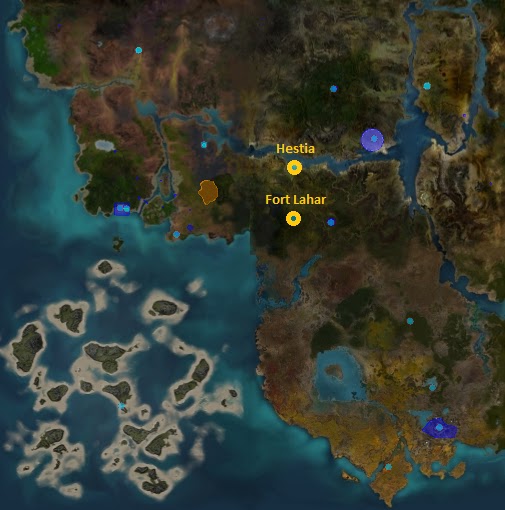
In the development we say goodbye to Fort Isis as new teleporters appear. Roughly in the same area where Fort Isis used to exist we now see Fort Lahar, and to the north Hestia, one of the many allotted places reserved for player housing popping up around Calypso.


The robot war: Persistent attacks!

Earlier last year MindArk implemented a new dynamic event system, which has been used to create a number of Robot Invasion events on the planet Calypso, almost a year later we now we have seen the further implementation of this across Calypso...

The robot war continued to rage on with more aggressive attacks on outposts and forts. Attacking such locations as Fort Pandora and Fort Medusa. Just like the other Forts, Fort Lahar had a nearby robot spawn which triggers a pre-event after enough robots have been destroyed.


Currently the robots have been pushed back and now the CDF forces are interrogating an RX scout imprisoned at Cape Corinth to discover the locations of hidden RX Caches containing powerful technology.

The RX scout has been nicknamed 'Silent Stan' by CDF soldiers because of his strong resistance to interrogation. Currently Cape Corinth residents are deeply worried, fearing the capture will cause robot reprisals as the RX forces are gathering outside Cape Corinth and are preparing to attack the city!

The CDF suspect the RX forces are preparing to remove and re-conceal RX caches, in case 'Silent Stan' reveals their secret locations whilst under interrogation. Groups of RX are also gathering in desert areas surrounding Fort Medusa and Fort Pandora.

The CDF has asked citizens to help push back the attacks on Cape Corinth and continued aid in locating and retrieving the RX caches.


Arkadia Deeds: Major price rise

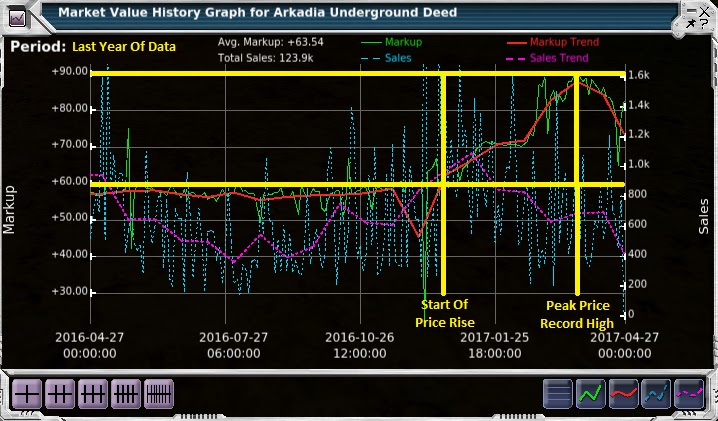
Over the last few months a number of Arkadia Underground Deed owners have noticed a massive rise in not only daily deed payouts but also market prices. No longer than 3 months ago deeds prices on the market was 60 PED, currently the market price is just dropping from a peak price of 90 PED. That is a 50% raise in less than 3 months.


A number of sources have speculated this is down to new high markup treasure existing on Arkadia, which has led to a number of miners migrating to Arkadia, in which case I speculated that the deeds will not hold this new high prices for long as this new loot starts to dissipate into the public's hands, which the signs are already showing.


ComPet: Trading

MindArk has announce a new system enabling Entropia Universe players to supply pets to ComPet players in return for PED will be available soon.

The first tradeable cross-platform pets will be ‘level-up pets’: pets that can only be used for leveling up existing pets in ComPet. ComPet players will be able to level up their pets faster using this method, so this will create a market for trained ‘level-up pets’ within Entropia Universe.

The ability to transfer ‘regular pets’ to and from ComPet will be introduced in future releases.

ComPet has now been fully released on Android, and is planned for release on iOS and Steam within the next few months. With huge anticipation a number of people are waiting on the first ComPet Deed payment, with no current indication of when the first payment will start and no current knowledge of the deeds paying daily, weekly or monthly.

MindArk has stated, "Entropia Universe is the primary product and focus of MindArk, and will continue to be so. In developing ComPet as an alternative gaming experience, MindArk has added an offering to complement and promote Entropia Universe. This is an effort that MindArk would like to continue, expanding and complementing Entropia Universe with new projects and experiences, thereby creating interesting and exciting growth opportunities in the upcoming year and beyond."


Unicode: More languages available

You have may have noticed a change in the font on your sticky notes as you type onto an older sticky note, this is due to an update in Entropia's font.

Even though this is just a small snippet of an update, it has huge implementations. While the old font still exists, the newer font (Arial Unicode MS) allows the support a wider range of characters and languages, such as Korean, Chinese, Japanese, Thai, Hindi, and more. This opens up Entropia to countries where the font was previously unsupported.


Battle Simulator: Arcade action!

The Battle Simulator is for everyone and will be instantly accessible via the Entropia Universe event list under global instances. Players will compete under identical conditions, with standard skill levels and weapons/ammo which are applied upon entering the simulator.


It is a stripped-down, old-fashioned arcade action assault course where finishing and getting the fastest time is all that counts. Only your reflexes and strategies will determine your place on the leader board and the prizes you win.

Completing the Battle Simulator course gives access to a special loot crate. Unclaimed loot from other players uncompleted runs may also increase the total value of the loot crate. Completion times will also be entered into the Battle Simulator weekly leader board, where participants compete for additional rewards.

After testing the simulator myself, I can tell the simulator is still in its early phases and a few bugs exist, so I have come up with a few tips for anyone trying the battle simulator out to avoid bugs and have a better experience:

  1. Before you start, zoom into first person view, and make sure you have a targeting cross hair.
  2. Avoid pressing space bar! You will automatically flip to mouse mode when the game starts, normally the space bar flips the controls between mouse and cursor mode, but in the battle simulator it turns the controls to cursor mode without being able to turn it back to mouse mode and it gets replaced by a jump button. This glitch will ruin your game.
  3. Aim the cross hair slightly above your. The aiming is slightly off.
  4. Keep moving! Health is very hard to restore in the simulator and you only get one chance.
  5. Be fast! The game is all about trying to finish before everyone else does, so kill fast and keep moving forward.
I wish good luck to everyone who takes part in the battle simulator!


Teleporter Tokens: No Go!

MindArk officially announced that the Privatization of the Teleporter System will not go ahead in Entropia Universe.

The MindArk management team has reviewed the proposal made by the President of Virtual Reality and owner of Rocktopia "John Jacob Neverdie" concerning teleporter fees, and has stated that such a system does not complement the current development plans for Entropia Universe and therefore will not be implemented.

However, the proposal was very interesting, and aspects of it may find their way into future planned systems and features where participants would be more receptive to optional fees that provide enhanced convenience and utility, although it is not states what this enhanced convenience could be.

This has made a lot of people sigh in relief as teleportation tokens will make it very hard for people to get about, especially traders who travel about to advertise wares and new exploring players with very little but a pack full of sweat.